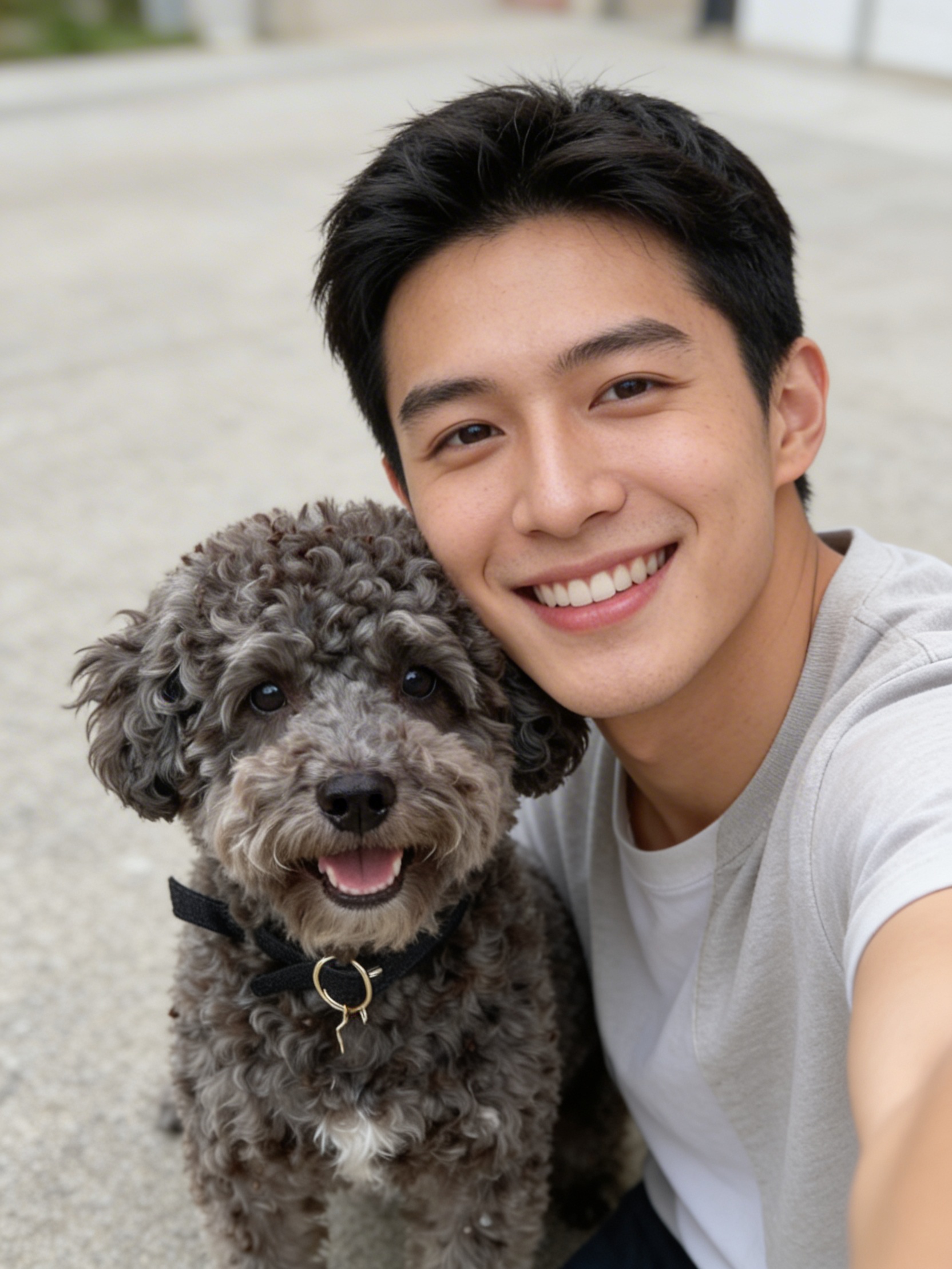
AI Dog Selfie generates cute dog selfie images with customizable breed, style, expression, and more. Ready-to-use REST inference API, no coldstarts, affordable pricing.
Idle
$0.05per run·~20 / $1
ExamplesView all
Related Models


README
AI Dog Selfie
Give your dog the photoshoot they deserve. AI Dog Selfie turns a simple photo of your pup into a polished, stylized portrait — complete with custom breed, size, outfit style, and expression. Whether your dog looks serious, happy, or somewhere in between, AI brings out their best side.
Upload a photo, dial in the vibe, and let your dog go viral.
Why You'll Love It
-
Fully customizable portraits Control the breed look, body size, clothing style, and facial expression to get exactly the portrait you imagined.
-
Multiple dogs at once Generate portraits of one dog or a whole pack in a single run using the count parameter.
-
Endless style options From casual everyday looks to something more polished — style your pup for any occasion.
-
Expressive results Happy, surprised, serious — choose the mood that matches your dog's personality (or the one you wish they had).
Parameters
| Parameter | Required | Description |
|---|---|---|
| image | Yes | Reference photo of your dog for a more personalized result. |
| breed | No | Target breed appearance. Default: random. |
| count | No | Number of dogs to generate in the portrait. Default: 1. |
| dog_size | No | Size of the dog: any, small, medium, or large. Default: any. |
| style | No | Visual style of the portrait. Default: casual. |
| expression | No | Facial expression of the dog. Default: happy. |
How to Use
- Upload a photo — a clear photo of your dog helps the AI personalize the result.
- Choose a breed — pick a specific breed or leave it on random.
- Set count — generate one dog or multiple in a single image.
- Select dog size — any, small, medium, or large.
- Pick a style — choose the outfit and visual mood.
- Set an expression — happy and beyond.
- Hit Run — your dog's portrait is ready in seconds.
Pricing
Just $0.05 per image.
Best Use Cases
- Pet portraits — Create a stunning keepsake photo of your dog without a professional photographer.
- Social media content — Dog content dominates the internet — make yours stand out.
- Gifts — Print a stylized portrait of a friend's or family member's dog for a truly personal gift.
- Fun experiments — See what your mixed-breed pup would look like as a golden retriever or a husky.
Pro Tips
- A clear, well-lit photo of your dog facing the camera gives the most personalized output.
- Try the same photo with different expressions and styles for a fun comparison set.
- Use count to generate a group portrait if you have multiple dogs.
- No photo? No problem — leave image empty and let the AI invent a dog from scratch.
Notes
- All fields are optional — you can run it with no inputs at all for a surprise result.
- Ensure image URLs are publicly accessible if using a link rather than a direct upload.
- Please ensure your content complies with WaveSpeed AI's usage policies.
Ai Dog Selfie API — Quick start
Grab a WaveSpeedAI API key, then call POST https://api.wavespeed.ai/api/v3/wavespeed-ai/ai-dog-selfie with your input as JSON. The endpoint returns a prediction id; poll the prediction endpoint until status flips to completed, then read the output URL from data.outputs[0]. Examples for Ai Dog Selfie below.
HTTP example
# Submit the prediction
curl -X POST "https://api.wavespeed.ai/api/v3/wavespeed-ai/ai-dog-selfie" \
  -H "Content-Type: application/json" \
  -H "Authorization: Bearer $WAVESPEED_API_KEY" \
  -d '{
    "image": "https://example.com/your-input.jpg",
    "breed": "random",
    "count": 1,
    "dog_size": "any",
    "style": "casual",
    "expression": "happy"
}'

# Response includes a prediction id. Poll for the result:
curl -X GET "https://api.wavespeed.ai/api/v3/predictions/{request_id}/result" \
  -H "Authorization: Bearer $WAVESPEED_API_KEY"

# When status is "completed", read the output from data.outputs[0].
Node.js example
// npm install wavespeed
const WaveSpeed = require('wavespeed');

const client = new WaveSpeed(); // reads WAVESPEED_API_KEY from env

const result = await client.run("wavespeed-ai/ai-dog-selfie", {
        "image": "https://example.com/your-input.jpg",
        "breed": "random",
        "count": 1,
        "dog_size": "any",
        "style": "casual",
        "expression": "happy"
});

console.log(result.outputs[0]); // → URL of the generated output
Python example
# pip install wavespeed
import wavespeed

output = wavespeed.run(
    "wavespeed-ai/ai-dog-selfie",
    {
    "image": "https://example.com/your-input.jpg",
    "breed": "random",
    "count": 1,
    "dog_size": "any",
    "style": "casual",
    "expression": "happy"
}
)

print(output["outputs"][0])  # → URL of the generated output
Ai Dog Selfie API — Frequently asked questions
What is the Ai Dog Selfie API?
Ai Dog Selfie is a WaveSpeedAI model for image editing, exposed as a REST API on WaveSpeedAI. AI Dog Selfie generates cute dog selfie images with customizable breed, style, expression, and more. Ready-to-use REST inference API, no coldstarts, affordable pricing. You can call it programmatically or try it from the playground above.
How do I call the Ai Dog Selfie API?
POST your input parameters to the model's REST endpoint (shown in the API tab of this playground) with your WaveSpeedAI API key in the Authorization header. Submission returns a prediction ID; poll the prediction endpoint until status flips to "completed", then read the output URL from the result. The playground generates a ready-to-paste code sample in Python, JavaScript, or cURL for whatever inputs you've set. Full request/response shape is documented at https://wavespeed.ai/docs/docs-api/wavespeed-ai/ai-dog-selfie.
How much does Ai Dog Selfie cost per run?
Ai Dog Selfie starts at $0.050 per run. That figure is the base price — the final charge scales with the parameters you set in the form (output size, length, count, references, or whatever knobs this model exposes), so a higher-quality or larger output costs more than a minimal one. The exact cost for your current input is shown live next to the Generate button before you submit, and the actual per-call charge is recorded on the prediction afterwards.
What inputs does Ai Dog Selfie accept?
Key inputs: `image`, `breed`, `count`, `dog_size`, `expression`, `style`. The full JSON schema (types, defaults, allowed values) is rendered above the Generate button and mirrored in the API reference at https://wavespeed.ai/docs/docs-api/wavespeed-ai/ai-dog-selfie.
How do I get started with the Ai Dog Selfie API?
Sign up for a free WaveSpeedAI account to claim starter credits, copy your API key from /accesskey, then call the endpoint shown in the API tab of the playground. The playground also auto-generates a code sample in Python, JavaScript, or cURL for the parameters you've set.
Can I use Ai Dog Selfie outputs commercially?
Commercial usage rights depend on the model's license, set by its provider (WaveSpeedAI). The license summary appears on the model card above; see WaveSpeedAI's Terms of Service for platform-level conditions.