Topaz Image Restore enhances older and poorer quality photos through restoration. Remove dust, scratches, and damage from vintage photos. Ready-to-use REST inference API, best performance, no coldstarts, affordable pricing.
Idle
$0.15per run·~66 / $10
ExamplesView all

Related Models




README
Topaz Image Restore
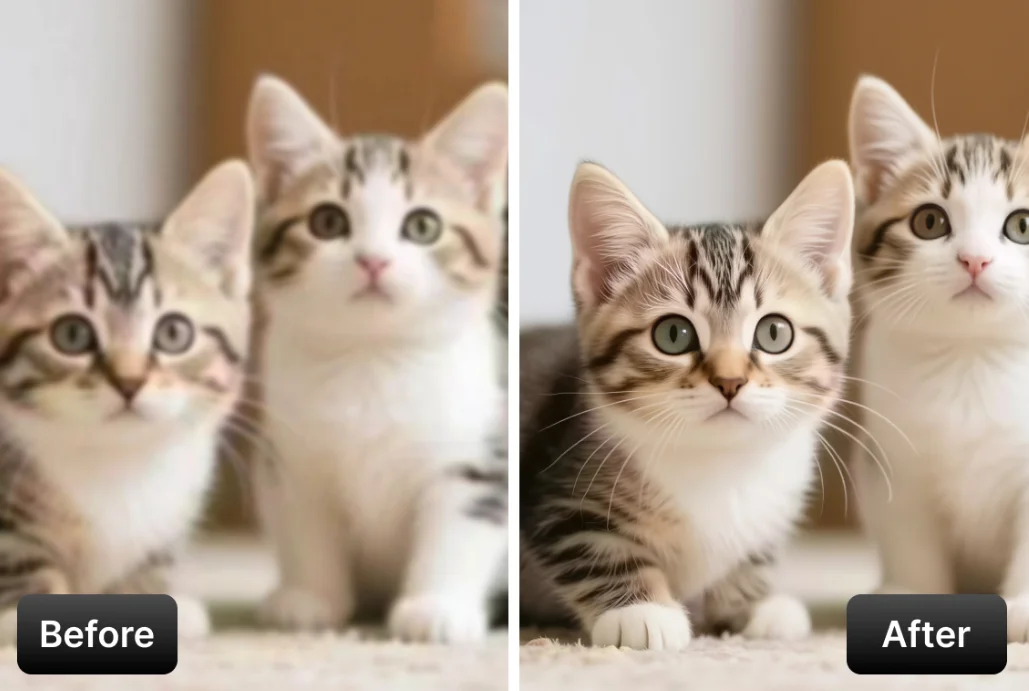
Topaz Image Restore is a professional-grade image restoration model powered by Topaz Labs' AI technology. Upload your image and let AI automatically detect and remove dust, scratches, and other imperfections — perfect for restoring old photos and scanned images.
Why Choose This?
-
Dust and scratch removal AI automatically detects and removes dust particles, scratches, and other surface imperfections.
-
Old photo restoration Ideal for restoring scanned photos, film negatives, and vintage images.
-
Professional quality Powered by Topaz Labs' AI, trusted by professional photographers and archivists.
-
Multiple output formats Export as JPEG, PNG, or TIFF based on your workflow needs.
Parameters
| Parameter | Required | Description |
|---|---|---|
| image | Yes | Source image to restore (upload or URL) |
| model | No | Restoration model to use (default: Dust-Scratch) |
| output_format | No | Output format: jpeg, jpg, png, tiff, or tif |
Model Options
| Model | Description |
|---|---|
| Dust-Scratch | Standard dust and scratch removal (default) |
| Dust-Scratch V2 | Improved version with better detection and removal |
Output Format Options
- jpeg / jpg — Compressed format, smaller file size
- png — Lossless format, supports transparency
- tiff / tif — Professional format, highest quality preservation
How to Use
- Upload your image — drag and drop or paste a URL.
- Select model — choose Dust-Scratch or Dust-Scratch V2.
- Choose output format — select based on your quality and file size needs.
- Run — submit and download the restored image.
Pricing
| Item | Cost |
|---|---|
| Per image | $0.15 |
Simple flat-rate pricing regardless of image size or model selected.
Best Use Cases
- Old Photo Restoration — Remove dust and scratches from vintage photographs.
- Film Scanning — Clean up scanned film negatives and slides.
- Archive Digitization — Restore historical images for digital archives.
- Family Photos — Bring old family photos back to life.
- Print Restoration — Clean up scanned prints with surface damage.
Pro Tips
- Use Dust-Scratch V2 for better results on heavily damaged images.
- For archival work, export as TIFF to preserve maximum quality.
- Combine with other Topaz tools (Sharpen, Upscale) for complete restoration workflow.
- Best results come from high-resolution scans of the original photos.
Notes
- This model is optimized for dust and scratch removal, not for colorization or major damage repair.
- For best results, scan original photos at high resolution before processing.
- V2 model generally produces better results but may take slightly longer.
Related Models
- Topaz Image Sharpen — AI-powered image sharpening.
- Topaz Image Denoise — AI-powered noise reduction.
Image Restore API — Quick start
Grab a WaveSpeedAI API key, then call POST https://api.wavespeed.ai/api/v3/topaz/image/restore with your input as JSON. The endpoint returns a prediction id; poll the prediction endpoint until status flips to completed, then read the output URL from data.outputs[0]. Examples for Image Restore below.
HTTP example
# Submit the prediction
curl -X POST "https://api.wavespeed.ai/api/v3/topaz/image/restore" \
  -H "Content-Type: application/json" \
  -H "Authorization: Bearer $WAVESPEED_API_KEY" \
  -d '{
    "image": "https://example.com/your-input.jpg",
    "model": "Dust-Scratch",
    "output_format": "jpeg",
    "enable_base64_output": false
}'

# Response includes a prediction id. Poll for the result:
curl -X GET "https://api.wavespeed.ai/api/v3/predictions/{request_id}/result" \
  -H "Authorization: Bearer $WAVESPEED_API_KEY"

# When status is "completed", read the output from data.outputs[0].
Node.js example
// npm install wavespeed
const WaveSpeed = require('wavespeed');

const client = new WaveSpeed(); // reads WAVESPEED_API_KEY from env

const result = await client.run("topaz/image/restore", {
        "image": "https://example.com/your-input.jpg",
        "model": "Dust-Scratch",
        "output_format": "jpeg",
        "enable_base64_output": false
});

console.log(result.outputs[0]); // → URL of the generated output
Python example
# pip install wavespeed
import wavespeed

output = wavespeed.run(
    "topaz/image/restore",
    {
    "image": "https://example.com/your-input.jpg",
    "model": "Dust-Scratch",
    "output_format": "jpeg",
    "enable_base64_output": false
}
)

print(output["outputs"][0])  # → URL of the generated output
Image Restore API — Frequently asked questions
What is the Image Restore API?
Image Restore is a Topaz model for image editing, exposed as a REST API on WaveSpeedAI. Topaz Image Restore enhances older and poorer quality photos through restoration. Remove dust, scratches, and damage from vintage photos. Ready-to-use REST inference API, best performance, no coldstarts, affordable pricing. You can call it programmatically or try it from the playground above.
How do I call the Image Restore API?
POST your input parameters to the model's REST endpoint (shown in the API tab of this playground) with your WaveSpeedAI API key in the Authorization header. Submission returns a prediction ID; poll the prediction endpoint until status flips to "completed", then read the output URL from the result. The playground generates a ready-to-paste code sample in Python, JavaScript, or cURL for whatever inputs you've set. Full request/response shape is documented at https://wavespeed.ai/docs/docs-api/topaz/topaz-image-restore.
How much does Image Restore cost per run?
Image Restore starts at $0.15 per run. That figure is the base price — the final charge scales with the parameters you set in the form (output size, length, count, references, or whatever knobs this model exposes), so a higher-quality or larger output costs more than a minimal one. The exact cost for your current input is shown live next to the Generate button before you submit, and the actual per-call charge is recorded on the prediction afterwards.
What inputs does Image Restore accept?
Key inputs: `image`, `enable_base64_output`, `model`, `output_format`. The full JSON schema (types, defaults, allowed values) is rendered above the Generate button and mirrored in the API reference at https://wavespeed.ai/docs/docs-api/topaz/topaz-image-restore.
How long does Image Restore take to generate?
Average end-to-end generation time on WaveSpeedAI is around 58 seconds per request — measured across recent runs. Queue time scales with global demand; live status is visible in the prediction record.
Can I use Image Restore outputs commercially?
Commercial usage rights depend on the model's license, set by its provider (Topaz). The license summary appears on the model card above; see WaveSpeedAI's Terms of Service for platform-level conditions.