GPT Image 1.5 text to image is OpenAI’s fast, cost-efficient text-to-image generator powered by GPT-5 guidance. Create photorealistic shots, product renders, concept art, and stylized graphics from natural-language prompts (optionally conditioned with an image). Supports custom aspect ratios, seeds, negative prompts, hex color hints, and style presets. Ready-to-use REST inference API, best performance, no coldstarts, affordable pricing.
Idle
$0.04per run·~25 / $1
ExamplesView all
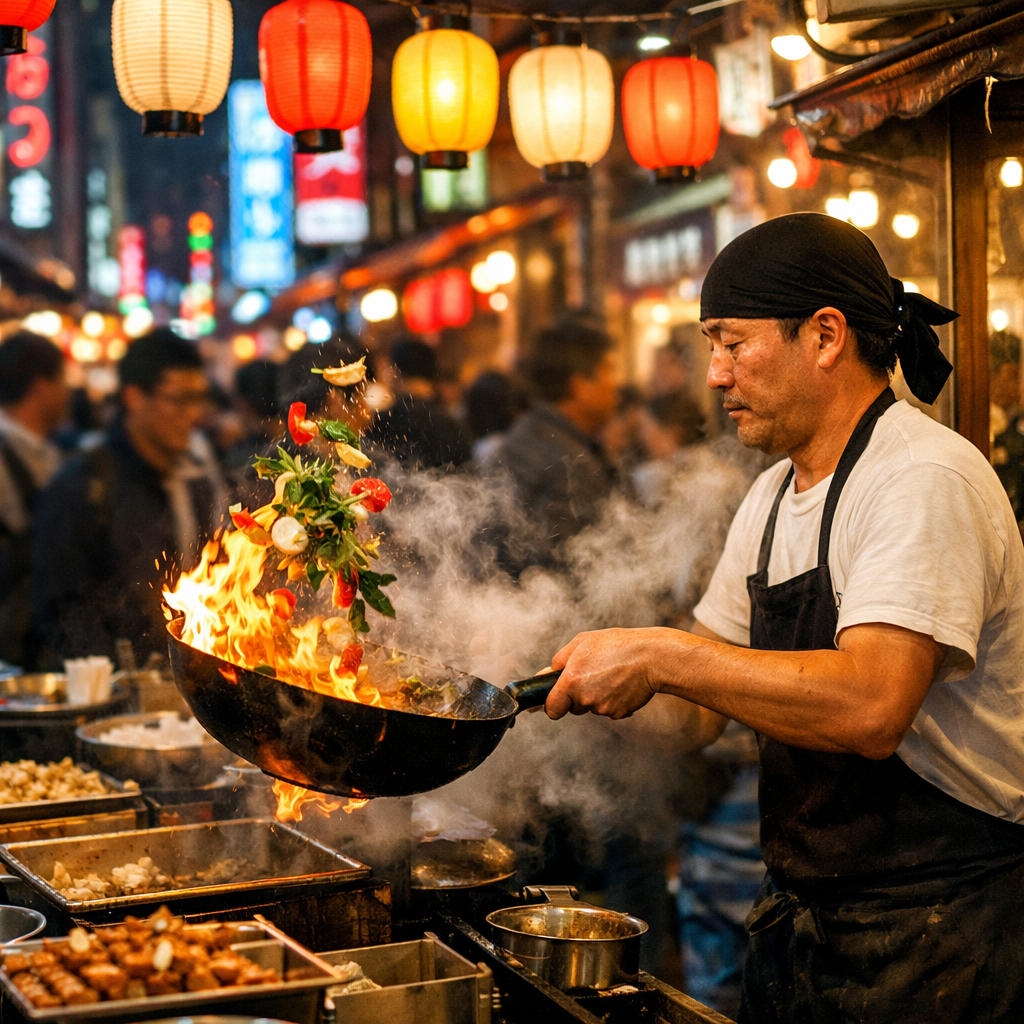
Street food market in Tokyo at night, chef tossing flaming wok with vegetables mid-air, steam rising, colorful paper lanterns overhead, motion blur on crowd in background, vibrant neon signs, photojournalism style

Portrait of a cyberpunk hacker, neon pink and blue rim lighting, chrome cybernetic implants on temple, rain droplets on skin, dark alley background with holographic advertisements, hyper-detailed, 8K

Macro photograph of morning dew drops on spider web, each droplet reflecting a tiny forest landscape, soft bokeh background, golden backlight, extreme detail, nature photography

Surrealist artwork of a giant whale swimming through clouds above a tiny village, bioluminescent patterns on whale skin, villagers looking up in wonder, dreamlike atmosphere, style of Salvador Dalí meets Hayao Miyazaki

Still life of a weathered leather journal, antique brass compass, dried lavender sprigs, on rough oak table, window light casting long shadows, dust particles in air, extreme texture detail, 100mm macro
Related Models





README
GPT 1.5 Text to Image
**GPT Image 1.5 text to image ** is a cost-efficient multimodal text-to-image generation model powered by OpenAI’s GPT image technology. It combines strong prompt understanding with optimized image synthesis to generate high-quality visuals from natural language — ideal for UI design, concept art, product mockups, and creative visualization.
🌟 Key Features
-
🧠 Strong Prompt Understanding Accurately interprets complex prompts, styles, and constraints to produce coherent, context-aware images.
-
🎨 Efficient Image Generation Generates polished, high-fidelity images with low latency and cost-friendly performance.
-
💡 Multimodal-Ready Foundation Built for workflows that benefit from both text guidance and visual reasoning.
-
💰 Cost-Effective at Scale Great for rapid iteration, A/B creative testing, and production pipelines.
-
🧩 UI/UX Friendly Outputs Performs well on clean compositions, modern design aesthetics, and structured layouts.
⚙️ Parameters
| Parameter | Description |
|---|---|
| prompt* | Text description of the desired image (e.g., “street food market at night, photojournalism style…”). |
| size | Output size: 1024×1024, 1024×1536, or 1536×1024. |
| quality | Output quality tier: low / medium / high. |
💡 Example Prompt
Street food market in Tokyo at night, chef tossing flaming wok with vegetables mid-air, steam rising, colorful paper lanterns overhead, motion blur on crowd in background, vibrant neon signs, photojournalism style
💰 Pricing
Reference table (total_price per image generated):
| Quality | 1024×1024 | auto / 1024×1536 / 1536×1024 |
|---|---|---|
| low | $0.01 | $0.015 |
| medium | $0.04 | $0.06 |
| high | $0.15 | $0.25 |
🎯 Use Cases
- UI / UX Design Concepts – Generate layouts, interface inspirations, and design directions.
- Product & Marketing Visuals – Create campaign-ready images and fast mockups.
- Creative Ideation – Explore styles, moodboards, and concept art quickly.
- Education & Presentations – Produce illustrative visuals for decks, demos, and teaching materials.
Gpt Image 1.5 Text To Image API — Quick start
Grab a WaveSpeedAI API key, then call POST https://api.wavespeed.ai/api/v3/openai/gpt-image-1.5/text-to-image with your input as JSON. The endpoint returns a prediction id; poll the prediction endpoint until status flips to completed, then read the output URL from data.outputs[0]. Examples for Gpt Image 1.5 Text To Image below.
HTTP example
# Submit the prediction
curl -X POST "https://api.wavespeed.ai/api/v3/openai/gpt-image-1.5/text-to-image" \
  -H "Content-Type: application/json" \
  -H "Authorization: Bearer $WAVESPEED_API_KEY" \
  -d '{
    "prompt": "A cinematic shot of a city at sunset, soft golden light",
    "size": "auto",
    "quality": "medium",
    "background": "opaque",
    "output_format": "jpeg",
    "enable_sync_mode": false,
    "enable_base64_output": false
}'

# Response includes a prediction id. Poll for the result:
curl -X GET "https://api.wavespeed.ai/api/v3/predictions/{request_id}/result" \
  -H "Authorization: Bearer $WAVESPEED_API_KEY"

# When status is "completed", read the output from data.outputs[0].
Node.js example
// npm install wavespeed
const WaveSpeed = require('wavespeed');

const client = new WaveSpeed(); // reads WAVESPEED_API_KEY from env

const result = await client.run("openai/gpt-image-1.5/text-to-image", {
        "prompt": "A cinematic shot of a city at sunset, soft golden light",
        "size": "auto",
        "quality": "medium",
        "background": "opaque",
        "output_format": "jpeg",
        "enable_sync_mode": false,
        "enable_base64_output": false
});

console.log(result.outputs[0]); // → URL of the generated output
Python example
# pip install wavespeed
import wavespeed

output = wavespeed.run(
    "openai/gpt-image-1.5/text-to-image",
    {
    "prompt": "A cinematic shot of a city at sunset, soft golden light",
    "size": "auto",
    "quality": "medium",
    "background": "opaque",
    "output_format": "jpeg",
    "enable_sync_mode": false,
    "enable_base64_output": false
}
)

print(output["outputs"][0])  # → URL of the generated output
Gpt Image 1.5 Text To Image API — Frequently asked questions
What is the Gpt Image 1.5 Text To Image API?
Gpt Image 1.5 Text To Image is a OpenAI model for image generation, exposed as a REST API on WaveSpeedAI. GPT Image 1.5 text to image is OpenAI’s fast, cost-efficient text-to-image generator powered by GPT-5 guidance. Create photorealistic shots, product renders, concept art, and stylized graphics from natural-language prompts (optionally conditioned with an image). Supports custom aspect ratios, seeds, negative prompts, hex color hints, and style presets. Ready-to-use REST inference API, best performance, no coldstarts, affordable pricing. You can call it programmatically or try it from the playground above.
How do I call the Gpt Image 1.5 Text To Image API?
POST your input parameters to the model's REST endpoint (shown in the API tab of this playground) with your WaveSpeedAI API key in the Authorization header. Submission returns a prediction ID; poll the prediction endpoint until status flips to "completed", then read the output URL from the result. The playground generates a ready-to-paste code sample in Python, JavaScript, or cURL for whatever inputs you've set. Full request/response shape is documented at https://wavespeed.ai/docs/docs-api/openai/openai-gpt-image-1.5-text-to-image.
How much does Gpt Image 1.5 Text To Image cost per run?
Gpt Image 1.5 Text To Image starts at $0.040 per run. That figure is the base price — the final charge scales with the parameters you set in the form (output size, length, count, references, or whatever knobs this model exposes), so a higher-quality or larger output costs more than a minimal one. The exact cost for your current input is shown live next to the Generate button before you submit, and the actual per-call charge is recorded on the prediction afterwards.
What inputs does Gpt Image 1.5 Text To Image accept?
Key inputs: `prompt`, `size`, `background`, `enable_base64_output`, `enable_sync_mode`, `output_format`. The full JSON schema (types, defaults, allowed values) is rendered above the Generate button and mirrored in the API reference at https://wavespeed.ai/docs/docs-api/openai/openai-gpt-image-1.5-text-to-image.
How long does Gpt Image 1.5 Text To Image take to generate?
Average end-to-end generation time on WaveSpeedAI is around 21 seconds per request — measured across recent runs. Queue time scales with global demand; live status is visible in the prediction record.
Can I use Gpt Image 1.5 Text To Image outputs commercially?
Commercial usage rights depend on the model's license, set by its provider (OpenAI). The license summary appears on the model card above; see WaveSpeedAI's Terms of Service for platform-level conditions.